
Café and Coffee Shop Website Design
People who type 'cafe near here' are usually looking for a place to sit for a few hours. What they want to know before heading out: the shape of the room, whether there are power outlets or not, and until what time you are open. The menu is still important, but the menu is usually read after they decide where to go.
What usually holds cafés and coffee shops back
Coffee shop visitors choose the place first and the drink second. They want to get some work done, meet a client, or get out of a noisy house. So what they look for is how far apart the tables are, whether there are outlets near the seats, how loud the music is, and whether there's an outdoor area for smokers. Almost no coffee shop writes this down anywhere, so prospective visitors guess from other people's photos in the reviews.
Photos are the second obstacle. A coffee shop's social media gallery is almost always dominated by top-down shots of drinks, when what people want to see is the room. A good photo of a latte tells them you take your coffee seriously, and that's where it stops. It doesn't tell them whether they'll still get a table if they come at four in the afternoon.
The last one is hours. Plenty of people set out at nine at night and arrive to find the chairs already stacked on the tables, or show up half an hour before closing and get turned away because last order has passed. Opening hours for each day and a clearly written last order time save people a wasted trip, and save your baristas an awkward conversation at the door.
What it can look like for cafés and coffee shops
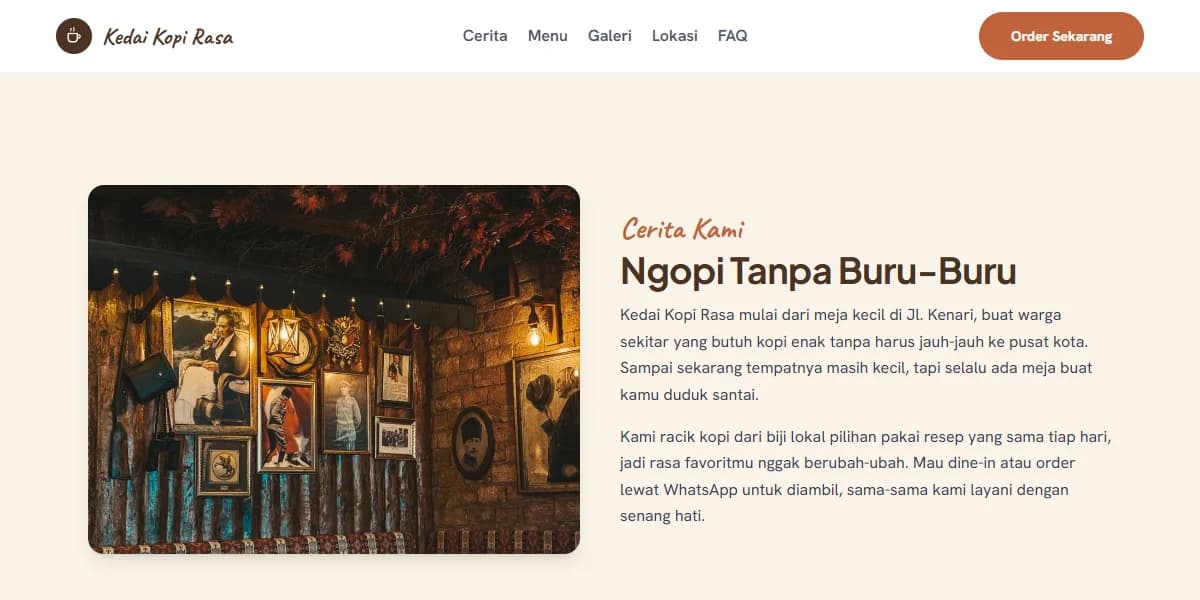
This Coffee Shop Rasa demo was built by us as an example of the format, not a paid client website. It contains one page: a menu panel in a chalkboard style with prices that can be read on a mobile phone screen, place photos, address and opening hours, and a WhatsApp button for ordering take-out.
What you get
For a coffee shop, the content that really determines whether people come or not is usually this:
- Menu with prices, including non-coffee items, because a group of three rarely orders all coffee
- Room photos from several angles: small tables for solo visitors, long tables for groups, and outdoor areas if available
- Information on power outlets and wifi, written as is, including if the outlets are only available on certain sides of the room
- Daily opening hours along with last order time
- Address with landmarks and parking information, which is often the final deciding factor before someone heads out
- Link to the messaging channel you already use, so orders don't get lost in a place you're not monitoring
- For restaurants: a complete menu that can be read directly on the page, not a PDF file that needs to be downloaded, and a table reservation button via WhatsApp for groups or events
What we don't recommend at the start: online ordering and payment on your own website. Customers are already used to ordering through food delivery apps, and opening a new channel means there needs to be someone monitoring website notifications during busy hours. Until someone is assigned to monitor it, the additional channel more often bothers the barista than increases orders.
Pricing for a café and coffee shop website
One cafe with one location is enough with the Starter package, Rp 1.500.000, which already includes a domain, hosting, and SSL for the first year, and will be completed around 3 days after we receive your complete materials.
The Business package, Rp 5.000.000, takes 1 to 2 weeks to complete, suitable if you have many room photos and want to display them in large size without slowing down the page, because in this package your images are stored in Cloudflare CDN. This package also includes a blog, which is usually used to write about the origin of beans or seasonal menus. The complete comparison is available on the package page, and we explain why large photos can slow down the page in the article about CDN.
Examples of page arrangements for cafes, roasteries, family restaurants, and food delivery shops are discussed in the article examples of cafe and restaurant websites.
Questions we often get from cafés and coffee shops
- I'm already on GoFood, GrabFood, and Google Maps. Do I still need a website?
Food delivery apps sell your drinks, Maps provides location and reviews. What's not available on either of them is a description of the place: photos of the room that you choose yourself, information about power outlets, last order time, and the atmosphere that you really want to show. For people who are looking for a place to work or meet, that's what matters most.
- Do you need to mention power outlets and wifi? I'm worried people will linger.
Write it as is, including any limitations you have. Sentences like 'power outlets are available at the window-side tables, and during busy weekend hours we ask for your understanding to limit your stay to two hours' are reasonable and won't offend people. What makes people annoyed is when they bring their laptops and only find out about the rules after they've sat down.
- My seasonal menu changes every few months. Should I create a separate section for it?
It's best to do so. Permanent and seasonal menus should be separated into two sections, so when the season changes, only one section needs to be updated and the main menu won't be affected. Changes like this are considered small tasks that we can help with, and if you want to make changes yourself at any time, it's included in the package with an admin panel, which we'll discuss before you decide.
- I have a restaurant, not a coffee shop. Is the format the same?
Most of it is the same: menu with prices, room photos, opening hours, address with landmarks, and a link to the delivery message channel. What is usually added for restaurants is table reservations via WhatsApp for groups or events, and a complete menu that can be read directly on the page without downloading a PDF. Restaurants with several branches should have a section per branch with their own hours and phone number, and that usually comes with the Business package.
- Can I also have online ordering with payment?
Yes, but that's a web application with a database and a connection to a payment provider, so the calculation is very different from a single page. A question that needs to be answered first is who will monitor incoming orders when the shop is full. If you don't have an answer yet, just link to the messaging channel you're already using.
Next step
Compare what each package includes side by side, or first read what to prepare before you order.
Related pages
Hotel Website Design
Hotel website with room photos as they are, facilities, stay policies, and reasons to book directly. See the demo, starting from Rp 1.500.000.
Florist Website Design
Florist website with a catalog per moment, delivery time limits, and ordering via WhatsApp. See the demo, prices start from Rp 1.500.000.
Wedding Planner Website Design
Wedding planner website with portfolio per event, package details, and inquiry form. See the demo, prices start from Rp 1.500.000.
Company Profile Website Design
Company profile website design: services, projects, legal details, and contact information that prospective clients can verify. See the demo, from Rp 1.500.000.